
Last updated: 16 July 2026
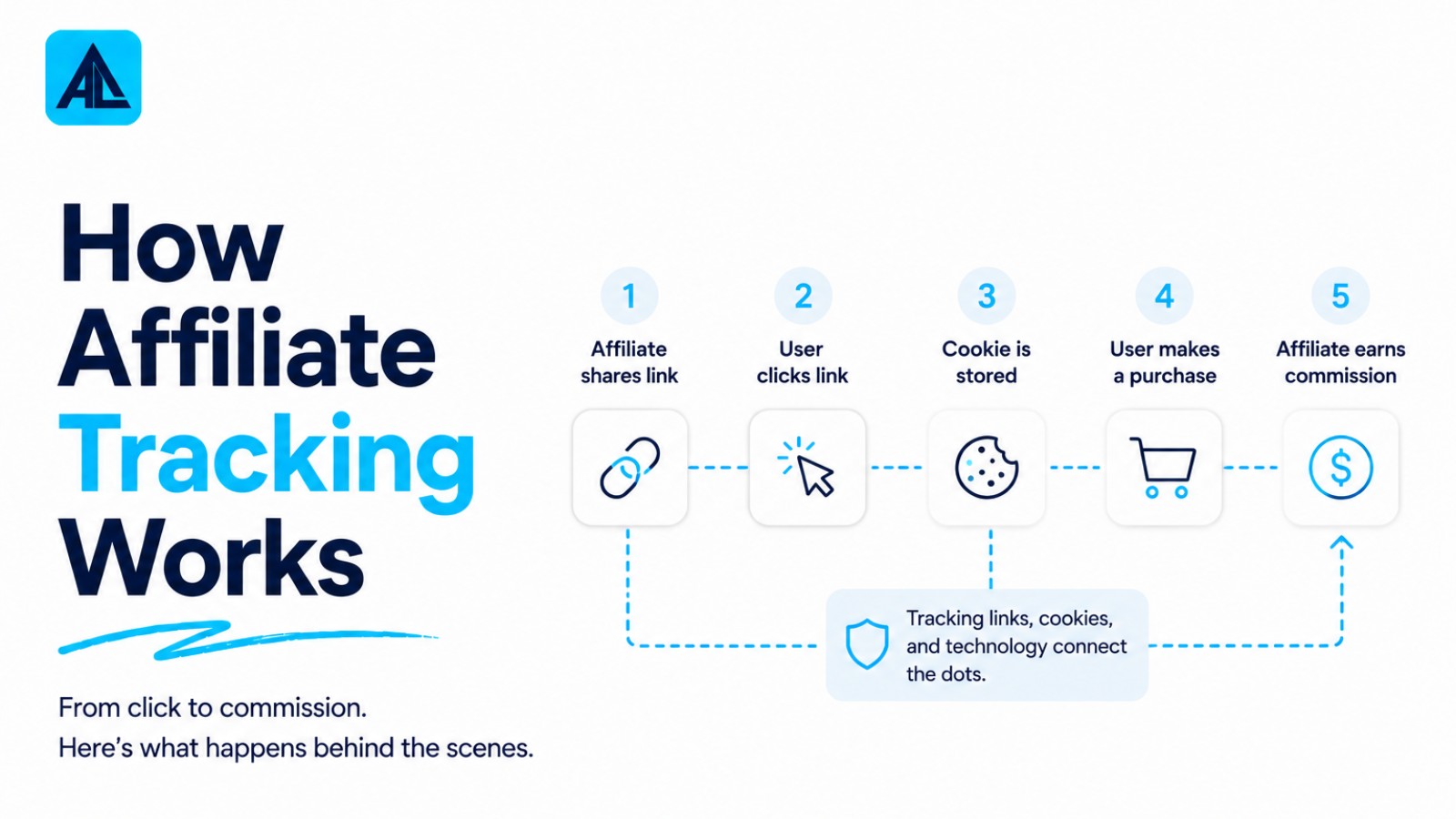
Affiliate tracking works by assigning each partner a unique identifier, then monitoring when a customer clicks that link, makes a purchase, and completes any required action. A tracking pixel or server-to-server call records the journey from click to conversion, attributing the sale to the correct affiliate and triggering commission payment. Without accurate tracking, programs lose money to attribution gaps and fraud. Understanding each layer of this chain determines whether your payouts are precise or hemorrhaging commissions.
Word count: 78
This guide traces every step: how a click gets tagged, how a conversion gets matched to that tag, and how the merchant's system records the result. It also names where each tracking method breaks down, not just where it works.
What You Need Before Touching a Single Tracking Link
Three things need to be in place before you start: a configured affiliate program account (network-based or in-house), access to your site's tag manager or server for pixel and postback setup, and a verified test conversion you can fire in a staging environment. Skip any one of these and you will spend hours debugging a live program instead of running one.
Your Affiliate Program or Network Account
You need an active account on the platform that will issue affiliate IDs and record conversions. That might be a managed network like ShareASale or Impact, or an in-house solution built on software like Post Affiliate Pro or Tapfiliate. The configuration matters more than the platform choice: commission rules, cookie windows, and attribution models all need to be set before you generate your first link.
A 30-day cookie with last-click attribution behaves very differently from a 7-day cookie with first-click. Changing that setting after affiliates are live creates retroactive attribution disputes that are genuinely difficult to resolve. The affiliate marketing channel now processes transactions across a global market estimated at $18.5 billion to $27.8 billion depending on methodology, so the platforms handling that volume have mature account structures. Most major networks require business verification, a payment method on file, and an approved program description before your account goes live. Budget a few business days for that process.
Tag Manager or Server Access
Once your account is configured, someone needs the technical access to install tracking code on your merchant site. For pixel-based tracking, that typically means edit rights inside Google Tag Manager or direct access to your site's <head> template. For server-side postback (also called S2S tracking), you need the ability to fire an HTTP request from your order confirmation logic, which usually means a developer or at minimum a no-code automation tool connected to your backend.
Pixel-based setups are faster to deploy but increasingly unreliable. Browser-level ad blockers and iOS privacy changes can suppress pixel fires, meaning conversions go unrecorded. Server-side postbacks are more robust but require backend access that not every merchant team has on hand. If your site runs on a hosted platform like Shopify, check whether your affiliate network has a native integration before assuming you need custom code. Many do, and that path is considerably simpler.
A Test Link and a Staging Conversion Event
Before you recruit a single affiliate, run the full tracking chain yourself. Generate a test affiliate link from your platform, click it in a private browser window, complete a test purchase or trigger a staging conversion event, and confirm the click and conversion both appear in your reporting dashboard. This end-to-end check takes about 20 minutes and catches the majority of setup errors before they affect real commissions.
Pay attention to what the platform records at each step: the click timestamp, the cookie or token stored, the conversion event fired, and the commission calculated. A click recorded but no conversion usually points to a broken pixel or a misconfigured postback URL. A conversion recorded but no commission usually points to an attribution window or eligibility rule filtering the event out. Knowing which layer failed is the difference between a 10-minute fix and a multi-hour investigation.
Step 1: Generate a Unique Affiliate Link with Tracking Parameters
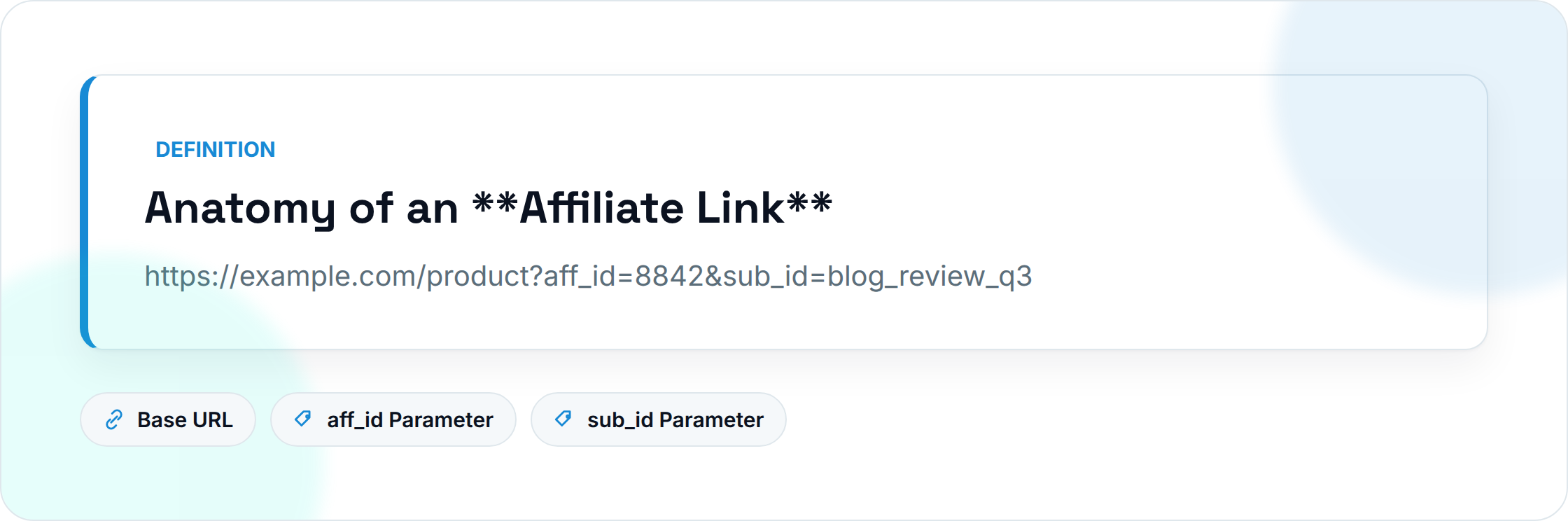
Every affiliate link is a standard destination URL with identifiers appended to the query string. The network or platform assigns each affiliate a unique ID, typically a short alphanumeric string, and encodes it as a parameter (for example, ?ref=af_8842 or ?aff_id=8842). When a visitor clicks that link, the server reads the parameter, logs the affiliate ID, and begins the attribution chain that eventually connects a sale back to the right partner.
How Affiliate IDs and Sub-IDs Get Appended
The base URL stays the same for every affiliate. What changes is the query string. A typical link looks like this:
https://example.com/product?aff_id=8842&sub_id=blog_review_q3
The aff_id identifies the affiliate account. The sub_id (sometimes called s1, s2, or tid depending on the network) is a free-form field the affiliate controls. Publishers use sub-IDs to tag individual placements: a banner versus an in-text link, a homepage versus a review post. Without sub-IDs, you can tell which affiliate drove a conversion but not which specific placement or creative did the work.
Affiliate link tracking as documented by Wecantrack confirms that clicks, conversions, and revenue are all tied back through this parameter chain, making the initial link structure the single most consequential decision in the whole tracking setup.
UTM Parameters vs. Network-Native Parameters
These two systems track different things and feed different tools. Network-native parameters (aff_id, sub_id, etc.) are read by the affiliate network's server. They drive commission attribution and appear in the network's reporting dashboard. UTM parameters (utm_source, utm_medium, utm_campaign) are read by Google Analytics or whatever analytics platform sits on the advertiser's side.
A complete link uses both layers:
https://example.com/product?aff_id=8842&sub_id=blog_review&utm_source=af_8842&utm_medium=affiliate&utm_campaign=summer_promo
The trade-off is URL length and maintenance overhead. Longer URLs are harder to QA, more likely to break if a CMS truncates the query string, and occasionally trigger spam filters in email clients. Some affiliate programs strip UTM parameters at the redirect stage, which means your analytics data goes dark even when the network records the click correctly. Test this before you distribute anything.
Confirming the Link Resolves Correctly
Paste the full link into a browser in incognito mode and trace every redirect. You are checking three things: the destination URL loads without errors, the network's tracking pixel or server-side log fires (visible in the network tab of browser dev tools), and the UTM parameters survive any intermediate redirects intact.
Most networks add at least one redirect hop through their own domain before forwarding to the advertiser. That hop is where parameters most often get dropped. If the final URL in the address bar is missing utm_source or sub_id, the redirect is stripping them, and you need to either encode the parameters differently or contact the network's technical support before the link goes live.
A quick check takes under two minutes per link. Skipping it is the most common reason affiliate reports show traffic with no corresponding analytics data.
Step 2: Drop the Tracking Cookie (or Fire the Server-Side Event) on Click
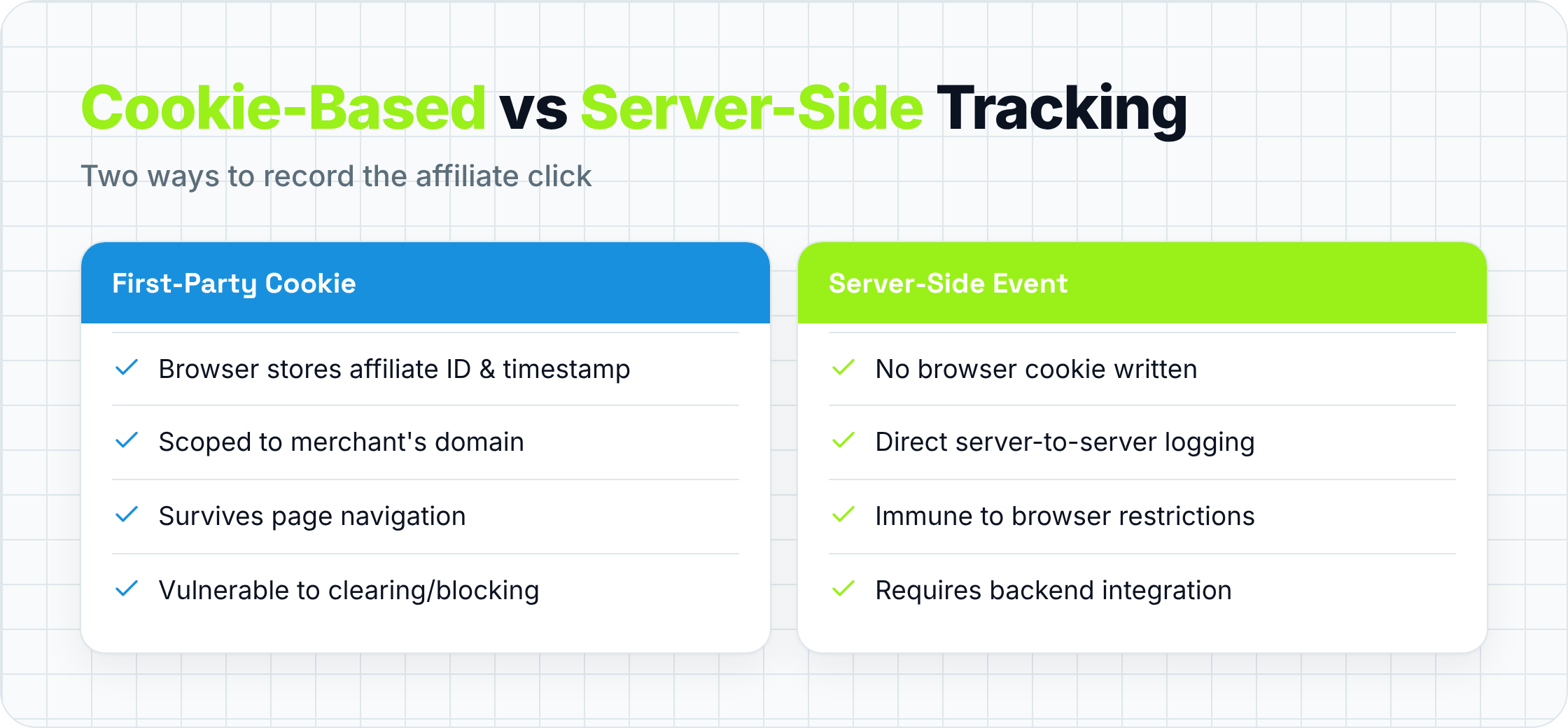
The moment a visitor clicks an affiliate link, the tracking system has one job: record who sent that person and when. It does this by either writing a small cookie to the visitor's browser or firing a server-side event that logs the click without touching the browser at all. That record becomes the evidence used later to match a completed purchase back to the right affiliate.
First-Party vs. Third-Party Cookies
When the merchant's own domain sets the cookie, it is a first-party cookie. The browser stores a file containing the affiliate ID, a timestamp, and sometimes the landing page URL, all scoped to that domain. Third-party cookies work the same way structurally, but they are written by a tracking domain that differs from the merchant's site, typically the affiliate network's domain.
Chrome's ongoing deprecation of third-party cookies has pushed most serious programs toward first-party setups, where the merchant's server sets the cookie directly and the network reads it via a server-to-server call rather than a browser script. First-party cookies survive most ad blockers and browser privacy settings. Third-party cookies get blocked by Safari's Intelligent Tracking Prevention by default, and Firefox follows similar rules. If your program still relies on third-party cookies, a meaningful share of clicks are going untracked right now.
Server-Side Tracking and Postback URLs
Server-side tracking skips the browser cookie entirely. When a visitor clicks, the affiliate platform logs the event on its own server and passes a unique click ID to the merchant via a URL parameter (often called clickid or subid). The merchant stores that ID in their own database. When a conversion happens, the merchant's server sends an HTTP request back to the platform's postback URL, carrying the click ID and the order value. No cookie required.
Tapfiliate's breakdown of affiliate tracking methods notes that server-to-server postbacks are increasingly the default for programs running in regulated industries or targeting privacy-conscious audiences. The trade-off is implementation complexity: the merchant's development team has to store the click ID through the entire checkout flow and fire the postback reliably on conversion. If the checkout has multiple steps or third-party payment redirects, the click ID can get dropped and the conversion goes unattributed.
Cookie Duration and Attribution Windows
Cookie duration is set at the program level, typically anywhere from 1 day to 90 days, with 30 days being the most common default. The number determines how long after a click the affiliate still gets credit for a conversion. A 7-day cookie means a visitor who clicks on Monday and buys the following Tuesday (day 8) generates zero commission for the affiliate, even though that click clearly influenced the purchase.
Longer windows favor affiliates and content publishers whose audiences research before buying. Shorter windows favor programs with fast purchase cycles and reduce the risk of affiliates claiming credit for organic conversions that would have happened anyway. Neither is objectively correct. The right window depends on your average time-to-purchase, which you can pull from your analytics platform before you set the program live.
Step 3: Match the Conversion Back to the Click
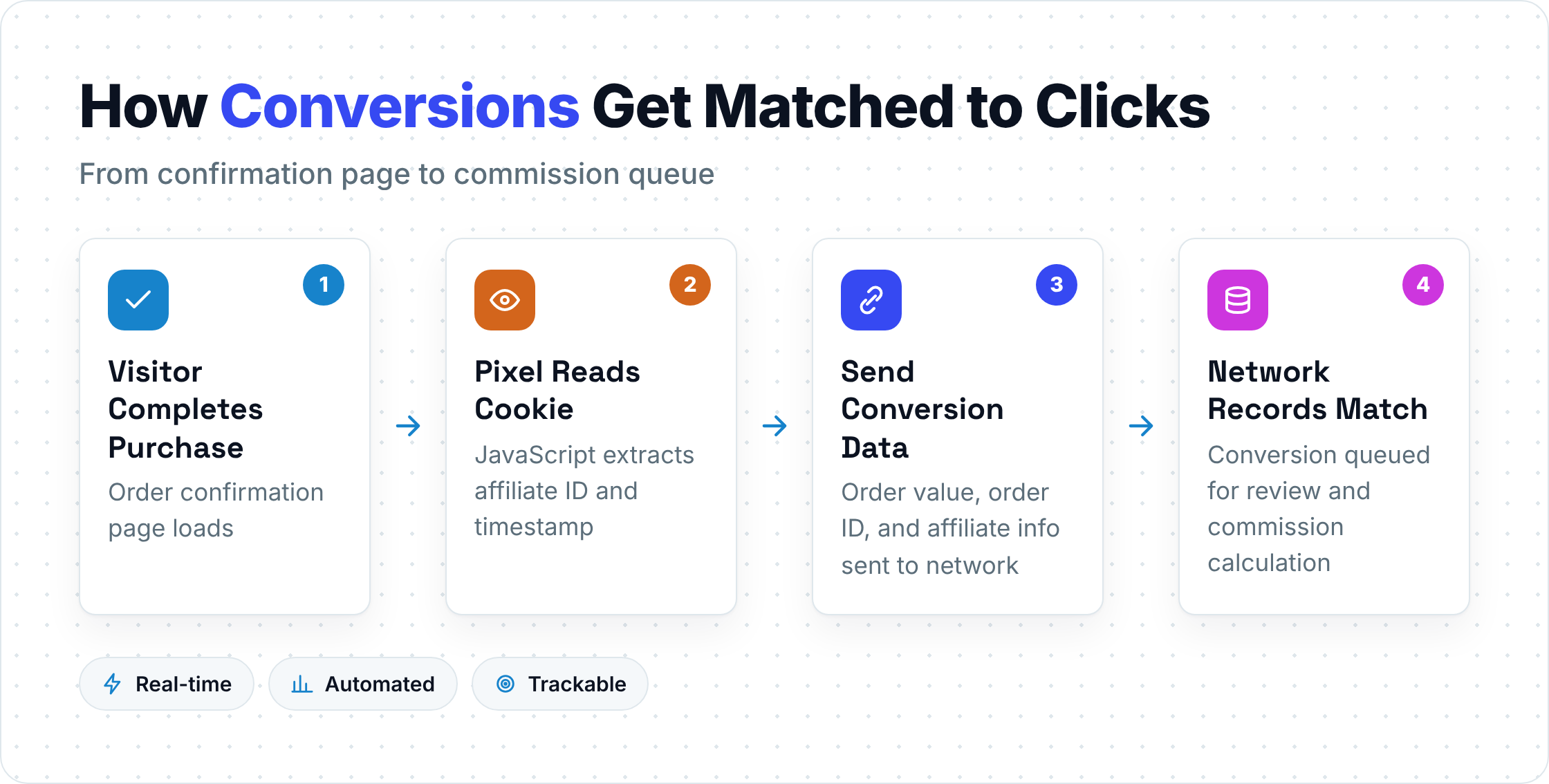
A conversion event fires when a visitor completes the action the program is tracking, usually a purchase, but sometimes a lead form, a free trial signup, or an app install. At that moment, the system needs to answer one question: which affiliate click does this conversion belong to?
How the Pixel Fires on the Confirmation Page
The most common setup places a small JavaScript snippet on the order confirmation page. When that page loads, the snippet reads the affiliate cookie stored in the visitor's browser, extracts the affiliate ID and click timestamp, and sends both to the network's server along with the order value and order ID. The network records the match and queues the commission for review.
The vulnerability here is obvious: if the cookie was blocked, expired, or cleared before the confirmation page loaded, the pixel fires but finds nothing to match. The conversion gets recorded as a sale with no affiliate attribution. From the affiliate's perspective, the click happened and the sale happened, but the commission never appears. This is the most common source of affiliate disputes.
Postback URL Confirmation (Server-Side)
With server-side tracking, the confirmation flow works differently. Your order management system fires an HTTP GET or POST request to the network's postback URL immediately after the order is confirmed. That request carries the click ID your system stored at the time of the original click, plus the order value and a unique transaction ID.
A typical postback URL looks like this:
https://network.com/postback?clickid={stored_click_id}&amount={order_value}&txid={order_id}
Because this request originates from your server rather than the visitor's browser, it is not affected by ad blockers, cookie restrictions, or the visitor closing the tab before the confirmation page fully loads. The trade-off: if your server fails to store the click ID correctly at step one, there is nothing to send at step three, and the conversion goes unattributed just as it would with a blocked cookie.
Multi-Touch Attribution and Last-Click Defaults
Most affiliate programs default to last-click attribution: whichever affiliate link the visitor clicked most recently before converting gets 100% of the commission. This is simple to implement and easy to audit, but it systematically undervalues affiliates who introduce customers early in the research process.
Some programs have moved to first-click attribution, linear attribution (splitting credit across all touchpoints), or position-based models (40% to first touch, 40% to last touch, 20% distributed across the middle). Each model produces different commission distributions from the same underlying click data. If you change attribution models after your program is live, expect pushback from affiliates whose earnings drop under the new rules. Document the model clearly in your program terms before you launch.
Step 4: Validate, Approve, and Pay the Commission
A recorded conversion is not the same as an approved commission. Most programs build a review period into the payout cycle, typically 30 to 60 days, to allow time for returns, chargebacks, and fraud checks before commissions are locked and paid.
The Review and Lock Period
During the review period, commissions sit in a "pending" state. If the underlying order is returned or charged back, the commission is reversed. If the order passes the review window without issue, the commission moves to "approved" and enters the next payment cycle.
The length of this window should match your return policy. A program with a 60-day return window that locks commissions after 30 days will regularly pay commissions on orders that later get refunded, creating a clawback problem. A program with a 14-day return window that holds commissions for 60 days will frustrate affiliates who are waiting on money they have clearly earned. Align the two numbers before you go live.
Fraud Detection at the Commission Layer
Before a commission is approved, most networks run basic fraud checks: duplicate order IDs, suspiciously high conversion rates from a single affiliate, orders placed immediately after a click with no browsing behavior, and IP address mismatches between the click and the conversion. These checks catch the most obvious fraud patterns but are not foolproof.
Coupon abuse is a specific problem worth calling out. Some affiliates scrape or leak coupon codes and then claim last-click credit for purchases made by customers who found the code elsewhere. If your program uses coupon codes as a tracking mechanism, consider whether the affiliate genuinely drove the customer or simply intercepted a conversion that was already happening. Some programs exclude coupon-only affiliates from commission eligibility or cap their commission rate to account for this.
Payment Methods and Thresholds
Most networks pay via PayPal, ACH transfer, wire transfer, or check, with a minimum payout threshold (commonly $50 to $100) before a payment is issued. Affiliates below the threshold carry their balance forward to the next cycle. International affiliates often face wire fees that eat into smaller commissions, which is worth disclosing in your program terms so partners can plan accordingly.
Step 5: Choose the Right Tracking Method for Your Setup
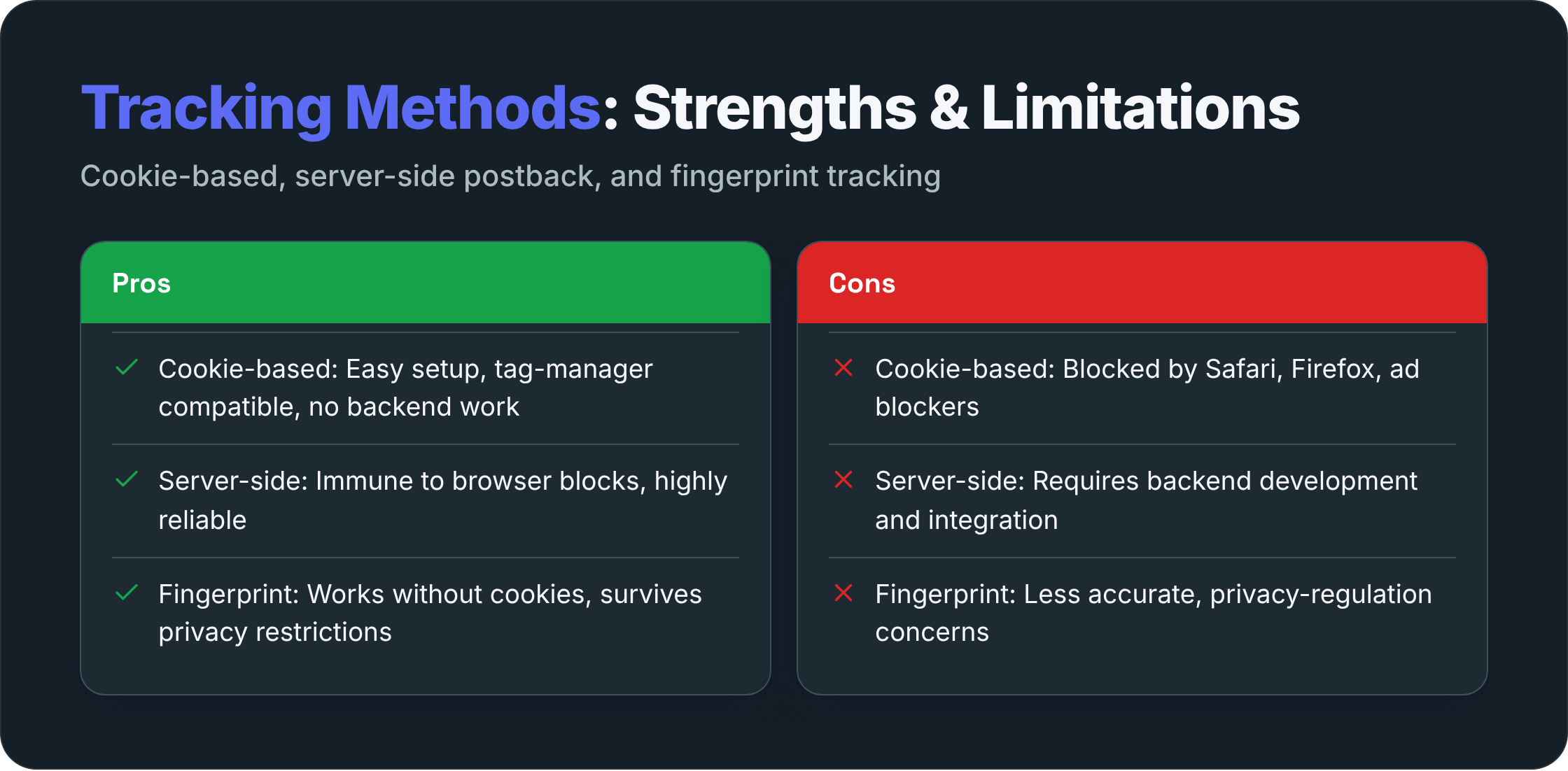
Understanding how does affiliate tracking work in theory is useful. Choosing the right method for your specific technical environment is where that understanding becomes practical. The three main options are cookie-based tracking, server-side postback tracking, and fingerprint-based tracking. Each has a different reliability profile and a different implementation cost.
Cookie-Based Tracking
Cookie-based tracking is the oldest and most widely deployed method. It is easy to set up, compatible with most affiliate networks out of the box, and requires no backend development work if you use a tag manager. The limitation is browser-level: Safari blocks third-party cookies by default, Firefox applies similar restrictions, and ad blockers suppress cookie writes on a significant share of traffic.
First-party cookie setups mitigate most of these issues, but they require the merchant's server to set the cookie rather than the network's script. If your network does not support first-party cookie mode, you are accepting a tracking gap on Safari and Firefox traffic that you cannot close without switching platforms or adding server-side infrastructure.
Server-Side Postback Tracking
Server-side postback tracking is the most reliable method available today. Because the conversion signal travels from server to server, it is immune to browser privacy settings, ad blockers, and tab-close events. The implementation cost is higher: a developer needs to store the click ID through the checkout flow and fire the postback on order confirmation.
For programs with significant traffic from privacy-conscious audiences, mobile apps, or regulated industries (finance, health), the reliability gain is worth the implementation cost. For small programs with simple checkout flows and technically capable teams, postback tracking is often the right default choice even without those specific pressures.
Fingerprint-Based Tracking
Fingerprint-based tracking identifies visitors by combining browser attributes: screen resolution, installed fonts, user agent string, timezone, and similar signals. It does not require a cookie or a stored click ID. When a conversion happens, the system compares the fingerprint of the converting visitor against fingerprints recorded at click time and looks for a match.
The accuracy of fingerprint matching degrades over time and across device changes. A visitor who clicks on a laptop and converts on a phone will not match. A visitor who updates their browser between click and conversion may not match either. Fingerprinting works best as a fallback layer when cookies and postbacks both fail, not as a primary tracking method. Some jurisdictions also have legal questions around fingerprinting without explicit consent, so check your compliance requirements before deploying it.
Common Tracking Failures and How to Diagnose Them
Even a well-configured program will occasionally produce attribution gaps. Knowing the most common failure patterns saves significant debugging time.
Clicks recorded, no conversions: The pixel is not firing on the confirmation page, or the postback URL is misconfigured. Check the network tab in browser dev tools on your confirmation page. If the pixel request is not visible, the tag is not installed correctly or is being blocked.
Conversions recorded, no commissions: An attribution rule is filtering the event. Check whether the conversion happened within the cookie window, whether the affiliate account is in good standing, and whether the order meets the minimum value threshold for commission eligibility.
Commission amounts are wrong: The order value being passed to the network does not match the actual order total. This often happens when the pixel or postback sends the pre-discount value instead of the post-discount value, or when shipping and tax are included when they should not be.
High click volume, low conversion rate: Either the traffic quality is poor, the landing page experience is broken for affiliate-referred visitors, or the cookie is being dropped before the visitor reaches checkout. Test the full flow from a fresh click to a completed purchase in an incognito window.
Frequently Asked Questions
What is the difference between a tracking pixel and a postback URL?
A tracking pixel is a small piece of JavaScript that runs in the visitor's browser when the confirmation page loads. It reads the affiliate cookie and sends the conversion data to the network. A postback URL is an HTTP request fired from the merchant's server directly to the network's server, with no browser involvement. Pixels are easier to set up but vulnerable to browser restrictions. Postback URLs are more reliable but require backend access to implement.
How long do affiliate cookies last?
Cookie duration varies by program, but 30 days is the most common default. Some programs set windows as short as 1 day (common in travel and deal sites where purchase intent is immediate) and as long as 90 days (common in software and high-consideration purchases). The duration is set by the merchant, not the affiliate, and applies uniformly across all partners in the program unless the merchant creates tiered cookie windows for specific affiliate tiers.
Can a visitor block affiliate tracking?
Yes. Ad blockers can suppress pixel fires and block cookie writes from known tracking domains. Safari's Intelligent Tracking Prevention limits third-party cookie lifetimes to 7 days and in some cases to 24 hours. Visitors who clear their cookies between click and conversion will also break the attribution chain. Server-side postback tracking is the most effective way to reduce (though not eliminate) these gaps, since it does not depend on the visitor's browser cooperating.
What happens if two affiliates both referred the same customer?
Most programs apply last-click attribution by default, meaning the affiliate whose link the customer clicked most recently before converting gets 100% of the commission. The first affiliate gets nothing, even if their content introduced the customer to the product. Some programs use first-click attribution or split the commission between multiple touchpoints, but these models require more sophisticated tracking infrastructure and are less common outside large enterprise programs.
Is fingerprint tracking legal?
It depends on jurisdiction and implementation. In the EU, fingerprinting without explicit user consent is generally considered a form of processing personal data under GDPR, and deploying it without a lawful basis creates compliance risk. In the US, the legal landscape is more fragmented, with California's CPRA applying to some use cases. If you are considering fingerprint tracking as a fallback method, review your privacy policy and consent mechanism with legal counsel before deploying it.
How do I know if my affiliate tracking is working correctly?
Run a test conversion yourself. Generate a test affiliate link, click it in a private browser window, complete a purchase or trigger a staging conversion, and verify that both the click and the conversion appear in your network's reporting dashboard with the correct affiliate ID, order value, and commission amount. Do this before you recruit affiliates and repeat it any time you make changes to your checkout flow, tag manager setup, or network configuration.
If you want a clearer picture of how your current tracking setup compares to what the best-performing programs are running, visit Affiliatelandscape for independent analysis and program benchmarks. The team there works across networks and verticals, so the guidance is grounded in real program data rather than vendor documentation.
Ready to explore the affiliate landscape?
Discover networks, tools, and opportunities in our directory.
Explore Directory